
In July 2023, GitHub released a new feature called repository rules. I didn’t pay much attention to it at first, but then I faced multiple cases where branch protection rules felt like “something is missing”, and recently I decided to give repository rules (A.K.A. repository rulesets) a try.
I was surprised by how much more flexible and powerful they are compared to traditional branch protection rules, so I wanted to share useful stuff about them, especially for those who haven’t heard of / tried repository rules yet.
1. Enforcing the merge method
I faced a case where we had two core branches - main (merged once per sprint, highly restricted, intended only for release deployments) and develop (core trunk for PR merges). GitHub allows three merge methods when merging a PR: “merge commit”, “squash”, and “rebase”. For every PR into develop, we wanted to enforce “squash” merges, so that each PR with multiple commits on the feature branch would be squashed into a single commit on develop, just to keep the history clean. For develop -> main merges, we wanted to allow “merge commits” to preserve the same commit history.
The problem is that with traditional repo settings + branch protection, there’s only a single global repo-wide setting for defined merge methods allowlist, which means that it applies to all branches:
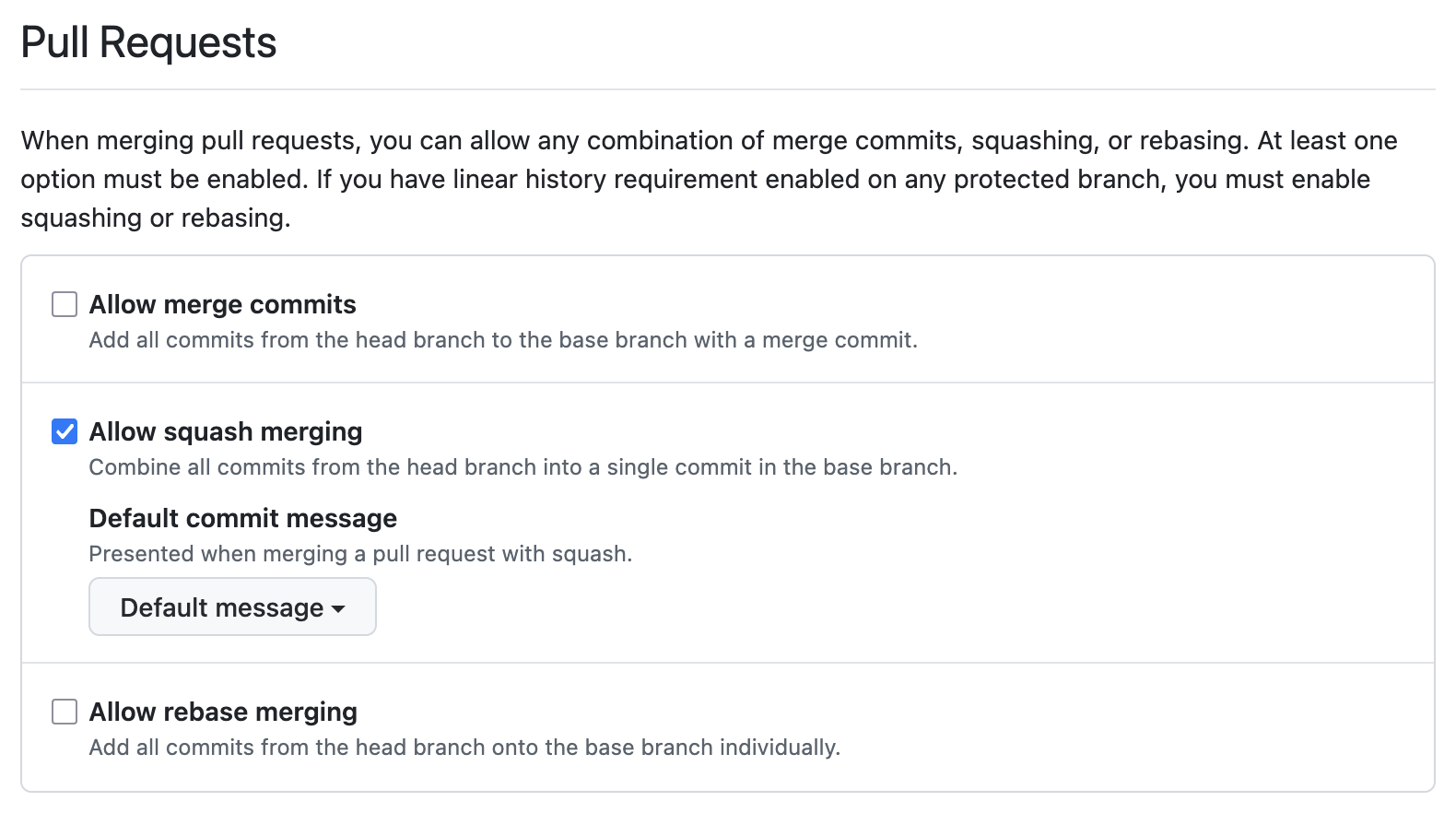
So if you want to enforce both rules, you need to do some release automation stuff to toggle the repo settings via GH API before merging to develop and toggling it back before merging to main.
GitHub repository rules solve that problem by putting the allowed PR merge methods as part of the ruleset itself, which means that a ruleset which covers develop can enforce “squash” merges, while a separate ruleset covering main can allow “merge commits”. You still have two separate rulesets the same way as you would have two branch protection rules, but the merge method enforcement is now part of the ruleset itself, which allows multiple merge method policies for different branches without any release automation hacks:
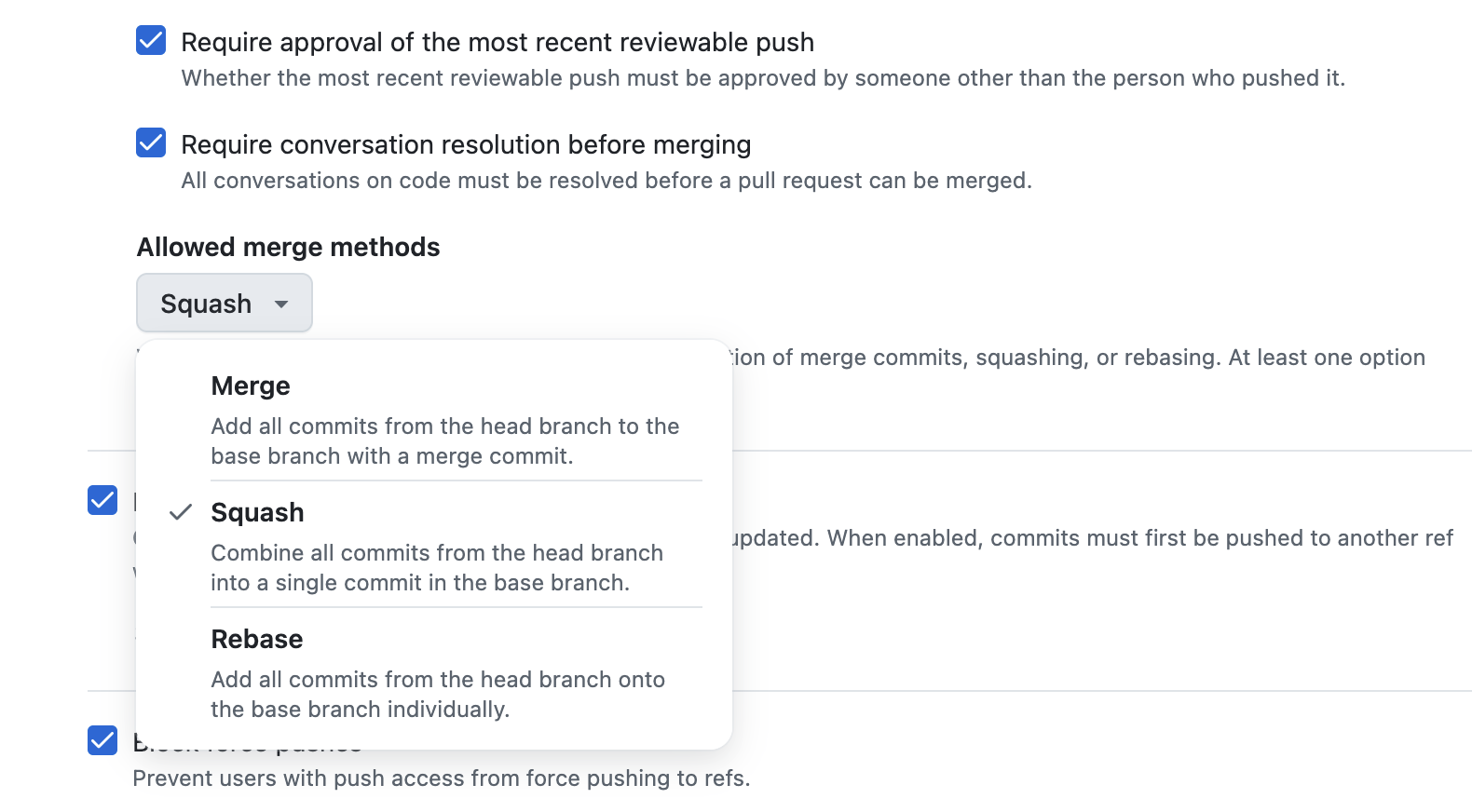
In Terraform, the PR merge method allowlist is just a field in the pull_request rule block:
rules {
  pull_request {
    allowed_merge_methods             = ["squash"]
    required_approving_review_count   = 1
    required_review_thread_resolution = true
  }
}
There are several more advanced rules blocks that one can use like file_extension_restriction, max_file_size, file_path_restriction etc. which I haven’t tried yet but they look powerful: https://registry.terraform.io/providers/integrations/github/latest/docs/resources/repository_ruleset#rules. And of course, there’s a copilot_code_review rule from the new AI world, which also shows that the GitHub team is investing in rulesets as the future and brings “cutting-edge” stuff there.
2. Push rules — enforce baseline to avoid .env files, PEM keys, and huge binaries in the repo
A server-side check is preferred for push hygiene rules like “.pem or a .env file should never be pushed to the repo”, and repository rulesets allow some smart filtering for that. Below is an example of a ruleset that forbids multiple bad practices and serves as a guardrail for the repo (and can be used as an org-level baseline as well):
resource "github_repository_ruleset" "push_hygiene" {
  name        = "Push hygiene"
  repository  = <repository>
  target      = "push"
  enforcement = "active"

  rules {
    file_path_restriction {
      restricted_file_paths = [".env*", "**/secrets/**", "*.pem"]
    }
    max_file_size {
      max_file_size = 50 # MB, 1-100
    }
    file_extension_restriction {
      restricted_file_extensions = ["*.exe", "*.dll", "*.zip", "*.gz"]
    }
  }
}
It doesn’t eliminate pre-commit hooks etc., but it’s a strict server-side guardrail, which is always a good thing to have for critical things.
3. Stacking rulesets (org level + repo level)
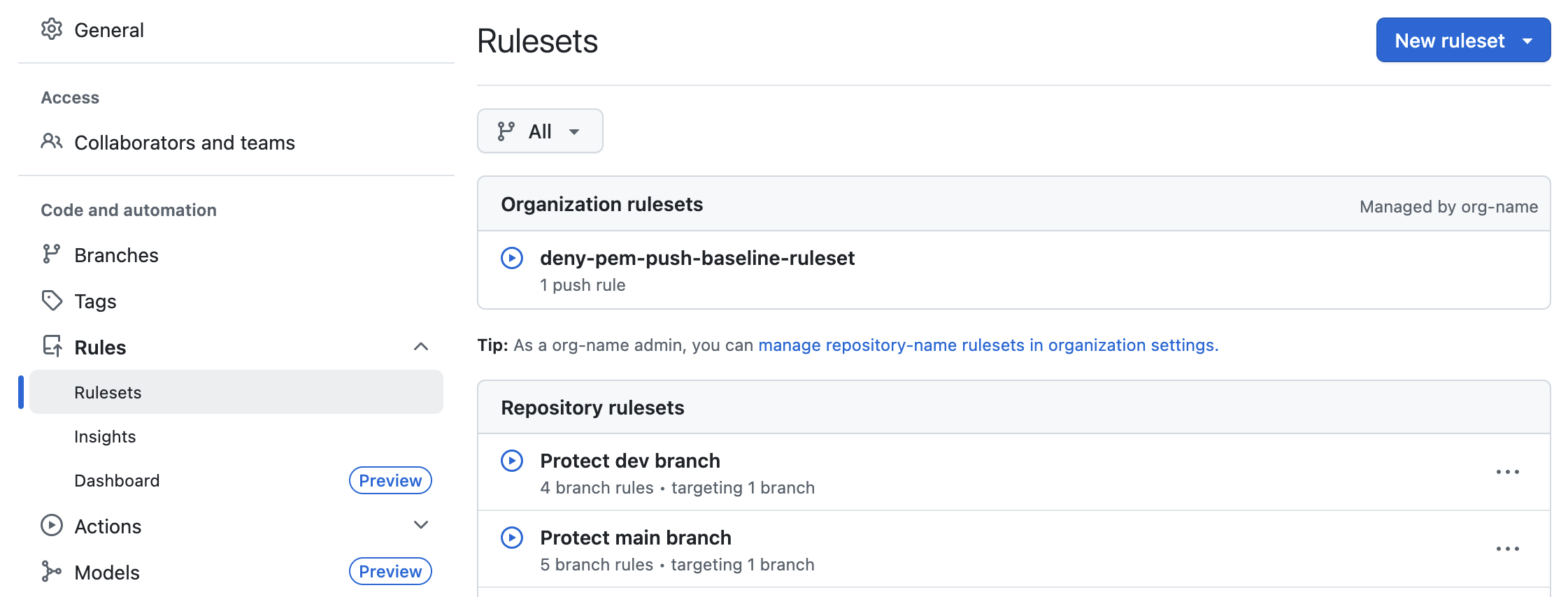
If you want a “no force pushes, no deletes, no direct commits” baseline for develop branches across every repo in an org and stricter per-repo rules on top, branch protection rules would require copy-pasting the baseline into every repo. Terraform simplifies that a bit, but centralized baselines are better anyway, and GitHub rulesets support that natively - you can define an org-level ruleset and repo-level rulesets to get their rules merged together.
flowchart LR
  Baseline["Org ruleset (baseline)<br/>no force-push,<br/>no delete,<br/>no direct commits"] --> Merged["Effective rules on main"]
  RepoSpecific["Repo ruleset<br/>required checks,<br/>code owner review,<br/>squash-only merges"] --> Merged
  Merged --> Branch["refs/heads/main"]
You can see which rulesets compose the actual applied rules for any given ref via the repo’s Settings -> Rules -> Rulesets page:
4. Dry-running a new rule with enforcement = "evaluate"
Branch protection is all-or-nothing, and what’s more important - it’s always active, so you need to delete / modify the branch protection rule to test new behavior, or temporarily change it. Rulesets, on the other hand, support an additional evaluate value for the enforcement field, in addition to active and disabled.
Note: only GitHub Enterprise plan is eligible for this feature at the moment of writing:
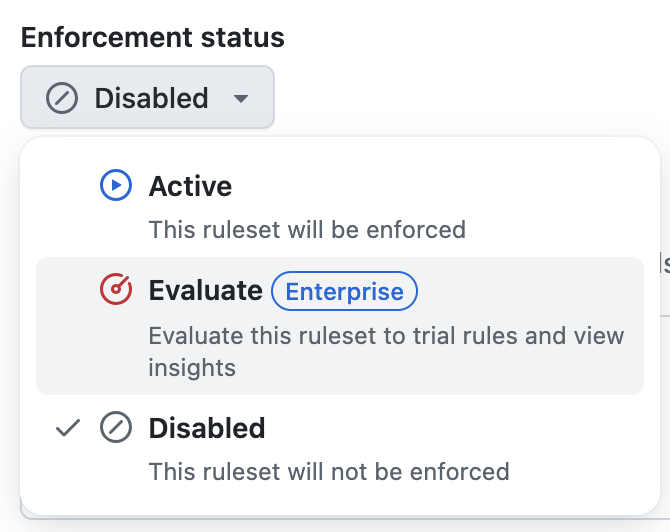
It means that you can deploy a new ruleset in “evaluate” mode and track the actions for some time to understand how it would impact the usual workflows without actually blocking anything:
resource "github_repository_ruleset" "new_main" {
  name        = "New main (evaluating)"
  repository  = <repository>
  target      = "branch"
  enforcement = "evaluate" # TODO: change to "active" after testing

  conditions {
    ref_name {
      include = ["refs/heads/main"]
      exclude = []
    }
  }
  ...
}
You can leave it in evaluate mode for some time, check the Rule Insights dashboard to see the stats. I don’t have much info about it yet, but the query params allow filtering it like this:

5. Commit message and author patterns
If you enforce Conventional Commits or a corporate email domain, rulesets have a first-class block for each:
rules {
  commit_message_pattern {
    name     = "Conventional Commits"
    operator = "regex"
    pattern  = "^(feat|fix|chore|docs|refactor|test|ci)(\\(.+\\))?: .+"
  }

  committer_email_pattern {
    name     = "Corporate email only"
    operator = "ends_with"
    pattern  = "@example.com"
    negate   = false
  }
}
It supports starts_with, ends_with, contains, and regex operators, each with a negate flag. Branch protection has nothing like this — you can do somewhat similar things with a GitHub Action that comments on non-conforming PRs, or a bot that fails a check, but with rulesets it’s a native server-side enforcement, which is much easier to configure and maintain.
Note: commit_message_pattern, committer_email_pattern, commit_author_email_pattern, branch_name_pattern, and tag_name_pattern only apply to repositories within a GitHub Enterprise account — they can’t be used for individual users or regular organizations.
6. Tag protection
target = "tag" protects tags the same way target = "branch" protects branches:
resource "github_repository_ruleset" "release_tags" {
  name        = "Protect release tags"
  repository  = <repository>
  target      = "tag"
  enforcement = "active"

  conditions {
    ref_name {
      include = ["refs/tags/v*"]
      exclude = []
    }
  }

  rules {
    deletion         = true
    non_fast_forward = true
    update           = true
  }
}
Nobody force-moves or deletes a v1.x.x release tag. Branch protection doesn’t cover tags at all. GitHub used to have a separate “Tag protection rules” feature, but it was sunset on in favor of rulesets, which means rulesets are now the only option to protect tags server-side.
When does branch protection still win?
Tbh, if you’re starting from scratch - never. It still works, but rulesets are overall more advanced, flexible and stackable in so many ways that I can’t see a reason to use branch protection rules at all if you have rulesets available. There’s no need to migrate straight away, but for any new rules, I definitely recommend using rulesets.